How to Pin Someone on Snapchat

Aria Murphy
Published Jan 14, 2026
Welcome to our guide on how to pin someone on Snapchat! If you’re looking to prioritize and easily access conversations with your favorite people, the pinning feature on Snapchat is here to help. Whether it’s a close friend, a family member, or a significant other, pinning conversations allows you to keep them at the top of your Chat screen for quick and convenient communication.
Key Takeaways:
- Pinning on Snapchat lets you prioritize conversations with your favorite people.
- Follow the steps mentioned in this article to pin and unpin someone on Snapchat.
- You can customize the pin emoji that appears next to a pinned person’s name.
- Currently, the pinning feature is only available for iPhone users.
- Android users may not have access to pinning at the moment, but it could be introduced in the future.
How Many People Can You Pin on Snapchat?
When it comes to pinning conversations on Snapchat, you may be wondering how many people you can actually pin. Well, the good news is that you can pin up to three people on Snapchat at a time. It’s a handy feature that allows you to prioritize your favorite contacts and keep their conversations easily accessible.
But before you get too excited, it’s important to note that pinning someone’s story on Snapchat is not possible. The pinning feature is strictly limited to conversations and does not extend to stories or snaps. So, while you can pin your friends and stay connected with them conveniently, you won’t be able to pin their stories for quick access.
Another thing to keep in mind is that pinning a conversation does not make a snap permanent on Snapchat. Snaps sent and received within the pinned conversation will still disappear after the usual time limit. So, if you’re hoping to keep a snap permanent, you’ll need to explore other options like saving it or using the memories feature within Snapchat.
Pin Limit Comparison:
| Platform | Pin Limit |
|---|---|
| iPhone | Up to 3 people |
| Android | Currently unavailable |
Note: The pinning feature on Snapchat is currently only available for iPhone users. Android users do not have access to this feature at the moment. However, there is a possibility that the feature will be rolled out to Android smartphones in the future.
Now that you know the pinning limit and the limitations of the feature, you can start prioritizing your conversations and keeping your favorite contacts just a pin away!
How to Unpin Someone on Snapchat
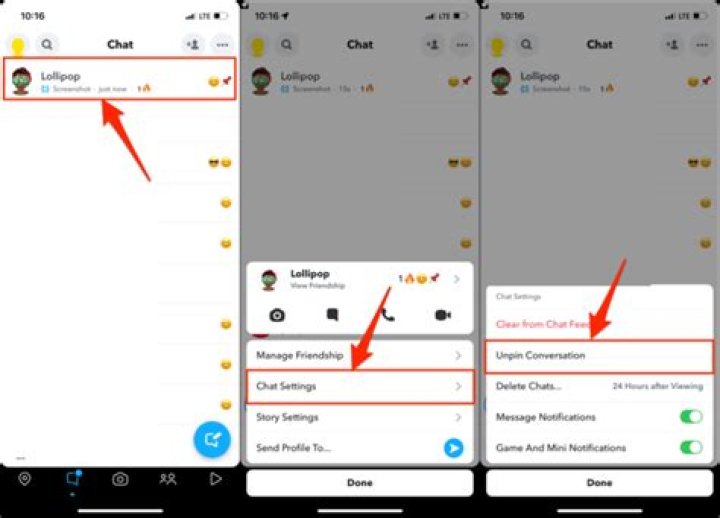
If you’ve pinned someone on Snapchat and want to unpin them, follow these simple steps:
- Open the Snapchat app and go to the Chat screen.
- Long-press the name of the person you want to unpin.
- In the pop-up menu, tap on “More”.
- Select “Unpin Conversation” from the options.
Once you’ve completed these steps, the person’s conversation will no longer be pinned and will be sorted by date along with your other Snapchat messages.
It’s important to note that unpinning a conversation does not affect the saving of snaps. If you want to save a snap, you’ll need to take a screenshot or use the save feature within Snapchat.
Having trouble understanding the pinning tool on Snapchat? Check out this table for a quick overview of the features:
| Pinning Tool | Function |
|---|---|
| Pin Conversation | Pins a conversation to the top of the Chat screen for quick access. |
| Unpin Conversation | Removes the pinned status from a conversation, allowing it to be sorted by date with other Snapchat messages. |
Remember, pinning conversations on Snapchat is a useful way to keep important chats easily accessible. If you decide to unpin a conversation, you can always pin it again later whenever you want.
What Does Pinning Mean on Snapchat?
Pinning someone on Snapchat means prioritizing their conversation to appear at the top of your Chat screen. By using this feature, you can easily find and access conversations with your favorite people on the app. Pinning a conversation does not notify the person you’ve pinned, and it does not affect their account status or visibility in any way. Instead, pinning is a helpful tool for organizing your chats and ensuring important conversations are always within reach.
When you pin a conversation, it remains at the top of your Chat screen, making it easier to locate and engage with the people you communicate with most frequently. Whether it’s exchanging messages, exchanging snaps, or watching videos on Snapchat, pinning allows you to streamline your communication process.
“Pinning on Snapchat is like having speed dial for your favorite contacts. It saves you time and effort by keeping the conversations that matter most to you at the forefront.”
It’s important to note that pinning is specifically for conversations and does not apply to pinning someone’s story or making snaps permanent. The pinning feature solely focuses on conversations and their accessibility within the app.
Now that you understand what pinning means on Snapchat, let’s move on to the next section to learn how to customize the pin emoji associated with pinned conversations.
Customizing the Pin Emoji on Snapchat
Snapchat allows you to personalize your pinned conversations by customizing the pin emoji that appears next to a pinned person’s name. This feature adds a touch of personalization to your chats. Here’s how you can do it:
- Open your profile in the Snapchat app.
- Tap on the Settings icon (gear icon) in the top-right corner.
- Scroll down and tap on “Manage.”
- Select “Friend Emojis” in the options.
- Look for the “Pinned Conversation” section and tap on it.
- Choose the emoji you want to use to represent a pinned person.
Once you’ve selected the emoji, it will replace the default pin icon next to the pinned person’s name. This customization feature allows you to add a personal touch to your conversations and make them even more meaningful.
To give you a better idea, here’s an example of how the pin emoji customization works:
Imagine you have pinned your best friend on Snapchat and want to add a touch of uniqueness to their conversation. You can customize the pin emoji to a heart symbol to symbolize your close bond, adding a bit of personality to your interaction.
Customizing the pin emoji offers a fun way to express yourself and make your pinned conversations stand out. So, get creative and make your chats on Snapchat even more special!
Pinning on Snapchat for Android Users
At present, the pinning feature on Snapchat is exclusively available for iPhone users. Unfortunately, Android users do not have access to the pinning tool at this time. However, there is a possibility that the feature will be rolled out to Android smartphones in the future. Despite this limitation, Android users can still fully enjoy the Snapchat experience and engage in conversations. The only difference is that they cannot pin conversations like their iPhone counterparts can.
For Android users, Snapchat remains a popular platform for sharing moments, connecting with friends and family, and exploring engaging content. While the pinning feature may not be available to them currently, there are still many other exciting features and functions to explore on Snapchat.
As the Snapchat app evolves and updates are released, Android users can look forward to potential additions, including the pinning feature. Until then, they can continue using Snapchat for their social and messaging needs while keeping an eye out for any future updates that may bring pinning to Android smartphones.
| Platform | Pinning Feature Availability |
|---|---|
| iPhone | Available |
| Android | Not Available |
Benefits of Pinning on Snapchat
Pinning conversations on Snapchat offers several benefits:
- Quick access: Pinned conversations appear at the top of the Chat screen, making it easy to find and access important conversations.
- Organization: Pinning allows you to prioritize conversations with your favorite people, helping you keep your Chat screen organized.
- Time-saving: By pinning conversations, you can quickly send messages or view stories from those you frequently interact with, without having to search through your entire chats list.
- Personalization: Snapchat allows you to customize the pin emoji, adding a personal touch to your pinned conversations.
Overall, pinning on Snapchat enhances the user experience and makes it more convenient to stay connected with your preferred contacts.
Pinning conversations on Snapchat can be a game-changer for users who want quick access to important chats, an organized Chat screen, time-saving communication, and the ability to personalize their conversations with a unique pin emoji. Pinning on Snapchat offers the efficiency and flexibility needed to stay connected in a fast-paced digital world. Whether it’s keeping up with close friends, staying in touch with family, or engaging with business contacts, pinning on Snapchat makes communication seamless and enjoyable.
Pinning on Snapchat Web
Unfortunately, the pinning feature is not available on Snapchat Web at the moment. To utilize the pinning feature, you will need to access and use the Snapchat app on your mobile device.
If you want to pin someone on Snapchat, follow these steps using the Snapchat mobile app:
- Open the Snapchat app on your mobile device.
- Navigate to the Chat screen.
- Long-press the name of the person you want to pin.
- In the pop-up menu, tap on “More”.
- Select “Pin Conversation” from the options.
By pinning someone on Snapchat, their conversation will appear at the top of your Chat screen, allowing for easy access and prioritization.
Conclusion
Pinning on Snapchat is a valuable feature that allows you to prioritize and easily access conversations with your favorite people. By following the steps outlined in this article, you can effectively pin and unpin individuals on Snapchat. Remember that you can pin up to three people at a time, and you have the option to customize the pin emoji to personalize your conversations.
While Android users currently do not have access to the pinning feature, it may be introduced in the future. In the meantime, iPhone users can take advantage of pinning to keep their important chats at the top for quick and convenient communication.
Enjoy the benefits of pinning on Snapchat — quick access, organization, time-saving, and personalization. Pinning allows you to easily find and engage with the people you frequently interact with, enhancing your overall user experience on the platform. Make the most of this handy feature and stay connected with your preferred contacts effortlessly.
FAQ
How do I pin someone on Snapchat?
To pin someone on Snapchat, open the app and navigate to the Chat screen. Long-press the name of the person you want to pin, tap on “More,” and select “Pin Conversation” from the options. The person’s conversation will now be pinned to the top of your Chat screen.
How many people can I pin on Snapchat?
You can pin up to three people on Snapchat at a time. However, it’s important to note that the pinning feature is only available for conversations and not for pinning someone’s story on Snapchat.
How do I unpin someone on Snapchat?
To unpin someone on Snapchat, go to the Chat screen, long-press the name of the pinned person you want to unpin, tap on “More,” and select “Unpin Conversation” from the options. The person’s conversation will no longer be pinned and will be sorted by date along with other Snapchat messages.
What does pinning mean on Snapchat?
Pinning on Snapchat means that the conversation with a pinned person will be prioritized and appear at the top of your Chat screen. This makes it easier to find and access conversations with your favorite people on the app.
Can I customize the pin emoji on Snapchat?
Yes, you can customize the pin emoji that appears next to a pinned person’s name on Snapchat. To do this, open your profile in the Snapchat app, tap on the Settings icon, scroll down and tap on “Manage,” select “Friend Emojis,” and then tap on “Pinned Conversation.” Choose the emoji you want to use to represent a pinned person.
Is pinning available on Snapchat for Android users?
No, currently, the pinning feature on Snapchat is only available for iPhone users. Android users do not have access to the pinning tool at this time. However, Android users can still use Snapchat and engage in conversations.
What are the benefits of pinning on Snapchat?
Pinning conversations on Snapchat offers several benefits, including quick access to important conversations, better organization of your Chat screen, time-saving for frequently contacted people, and personalization with custom pin emojis.
Can I pin conversations on Snapchat Web?
No, as of now, the pinning feature on Snapchat is not available on Snapchat Web. It can only be accessed and utilized through the Snapchat app on mobile devices.